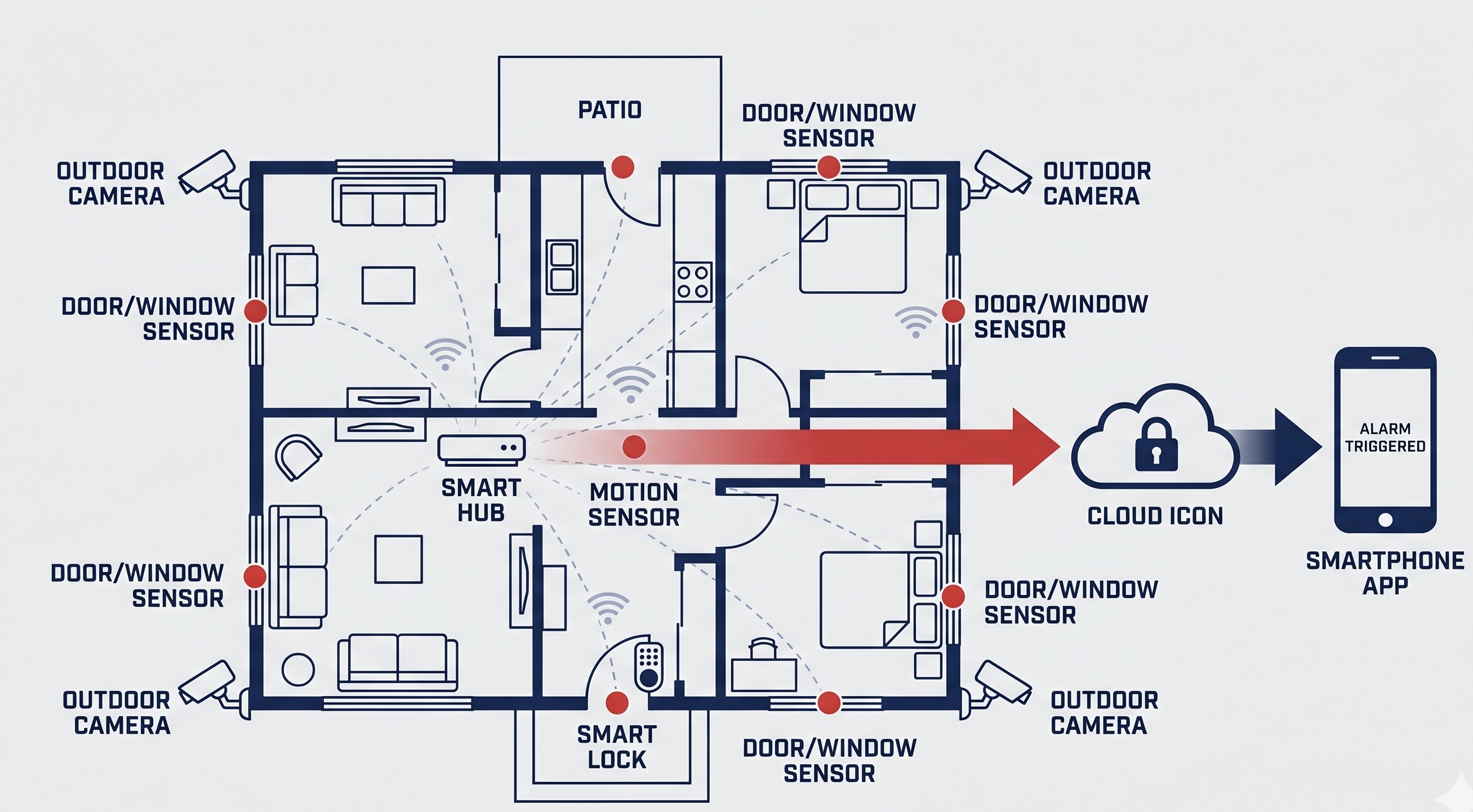
The Components of a Smart Security System
A modern smart home security system is built from several interconnected components, each serving a specific role. At the centre of most systems is a hub or control panel, which acts as the brain of the operation. The hub communicates wirelessly with every sensor, camera, and lock in your home, processing signals and deciding what action to take when something is detected.
The most common components include outdoor and indoor CCTV cameras, passive infrared (PIR) motion sensors, door and window contact sensors, a smart video doorbell, and one or more smart locks. Higher-end systems may also incorporate glass-break acoustic sensors, smoke and carbon monoxide detectors, and water leak sensors, creating a comprehensive safety net that goes beyond intrusion detection alone.
All of these devices connect to a central app on your smartphone, giving you a single dashboard to view camera feeds, check sensor status, lock or unlock doors, and review event history. Most modern systems use encrypted Wi-Fi or a dedicated wireless protocol such as Zigbee or Z-Wave to ensure reliable, secure communication between components.
How Motion Detection and AI Work
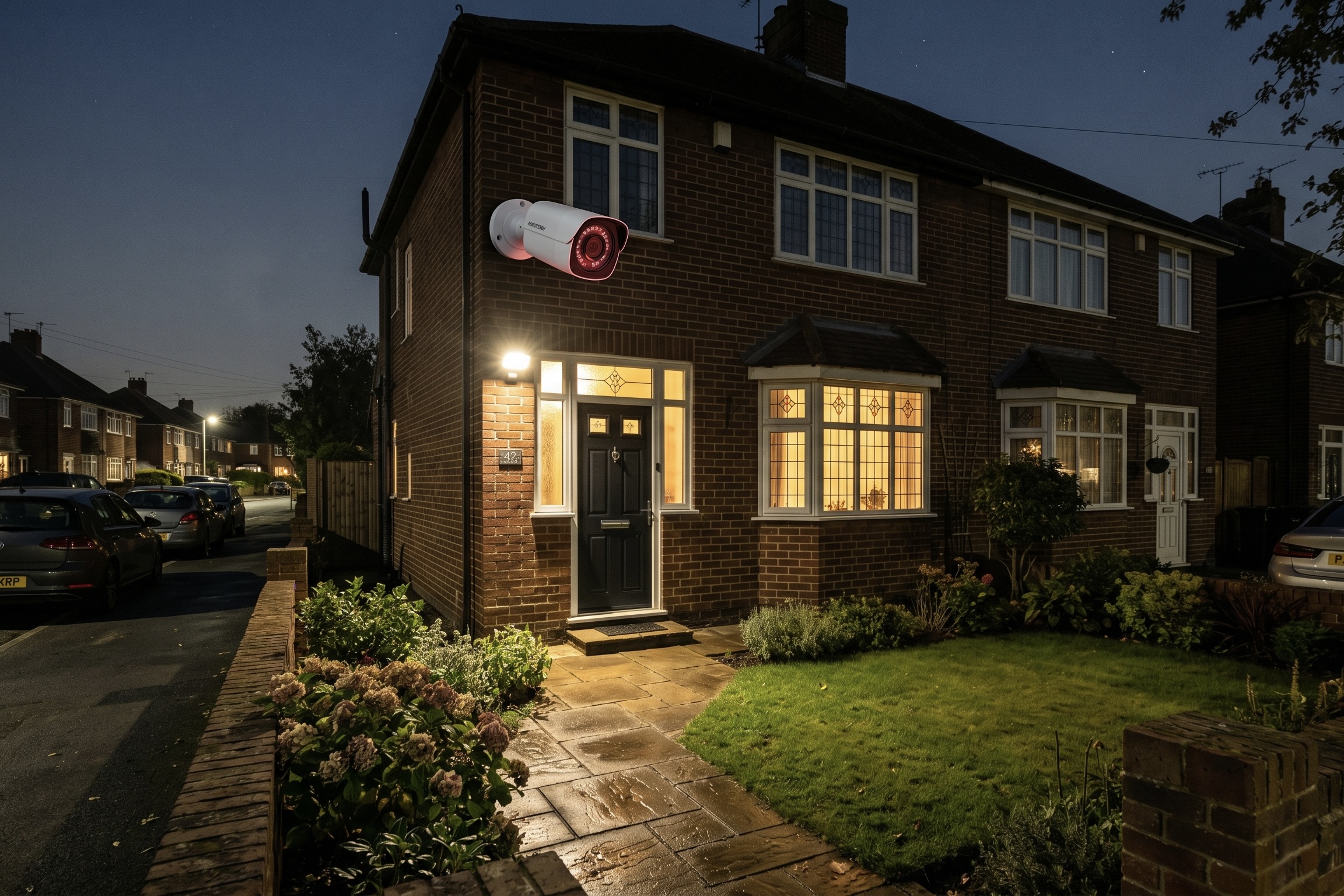
Modern cameras use infrared LEDs to produce clear footage even in complete darkness.
Traditional motion sensors work by detecting changes in infrared radiation within their field of view. When a person (or animal) moves through the sensor's detection zone, the change in heat signature triggers an alert. While effective, basic PIR sensors can produce false alarms from pets, moving curtains, or sudden temperature changes.
The latest generation of smart cameras and sensors use artificial intelligence to dramatically reduce false alerts. AI-powered cameras can distinguish between a person, a vehicle, an animal, and general movement such as a tree branch swaying in the wind. Some systems go further with facial recognition, allowing the camera to differentiate between known household members and unfamiliar visitors. This means you receive meaningful alerts rather than a constant stream of notifications every time a cat crosses your driveway.
Night vision is another critical feature. Most outdoor cameras use infrared LEDs to capture clear black-and-white footage in total darkness, while premium models offer full-colour night vision using built-in spotlights. Weatherproofing rated to IP65 or IP66 ensures the cameras continue to function through rain, frost, and the full range of British weather conditions.
Professional Monitoring vs Self-Monitoring
One of the most important decisions when choosing a security system is whether to opt for professional 24/7 monitoring or manage alerts yourself. Both approaches have clear advantages, and the right choice depends on your lifestyle, budget, and peace of mind requirements.
| Feature | Self-Monitoring | Professional Monitoring |
|---|---|---|
| Alert delivery | Push notifications to your phone | Alerts go to a 24/7 monitoring centre |
| Response | You decide what action to take | Trained operators verify and escalate |
| Police dispatch | You must call 999 yourself | Centre contacts police on your behalf |
| Monthly cost | Free or low-cost app subscription | £20 – £50 per month |
| Insurance discount | Limited or none | Typically 10–20% premium reduction |
| Best for | Budget-conscious, tech-savvy owners | Families, frequent travellers, high-value properties |
With self-monitoring, you receive push notifications directly to your phone and decide how to respond. This works well if you are generally available to check alerts promptly, but it does mean that if you are asleep, on a flight, or simply away from your phone, an alert may go unnoticed. Professional monitoring eliminates this gap by routing alerts to a staffed centre that operates around the clock, every day of the year.
The Installation Process
Whether you choose a DIY wireless system or a professionally installed solution, the process follows a logical sequence designed to ensure complete coverage of your property.
Property Assessment
A security advisor evaluates your property's layout, identifying vulnerable entry points such as doors, ground-floor windows, side gates, and any secluded areas that could provide cover for an intruder. They also assess your existing locks, lighting, and Wi-Fi signal strength to determine what equipment you need.
System Design & Recommendation
Based on the assessment, a tailored system is designed for your property. This includes selecting camera positions for maximum coverage, choosing the right sensor types for each room, and recommending whether self-monitoring or professional monitoring best suits your needs. You receive a clear proposal with itemised costs.
Equipment Installation
For wireless systems, sensors and cameras are mounted and paired with the hub — most wireless installs take just two to four hours. Wired systems, which are more common in new builds or larger properties, involve running cabling through the walls and may take a full day. All cameras are positioned and angled to eliminate blind spots.
Configuration & Testing
Every sensor, camera, and lock is individually tested to confirm reliable communication with the hub. Motion detection zones are calibrated to avoid false triggers from pets or passing traffic. The smartphone app is installed on your device and connected to your system, and you are guided through arming, disarming, and checking live feeds.
Activation & Handover
Once testing is complete, the system goes live. If you have opted for professional monitoring, the connection to the alarm receiving centre is verified. You receive a full walkthrough of daily operation, including how to create guest access codes, set automation schedules, and review recorded footage. Ongoing support is available if you need help adjusting settings later.
What Happens During an Alert
When a sensor is triggered while your system is armed, the sequence of events depends on your monitoring setup. In a self-monitored system, you receive an immediate push notification on your smartphone along with a video clip or live feed from the nearest camera. You can then view the footage, trigger the siren remotely, or call the police if you believe an intrusion is in progress.
With professional monitoring, the alert is routed to the alarm receiving centre within seconds. A trained operator reviews the signal, attempts to contact you or your designated keyholder, and if the alarm cannot be accounted for, contacts the local police. Many monitored systems are connected to police through the URN (unique reference number) scheme, which gives verified alarms a faster response priority.
Built to Withstand Real-World Conditions
Reliability matters when security is at stake. Quality systems include battery backup in the hub, ensuring the alarm continues to function during a power cut for a minimum of 12 to 24 hours. Outdoor cameras rated to IP66 are sealed against heavy rain, dust, and temperatures ranging from minus 20 to plus 50 degrees Celsius. Tamper detection alerts you if someone attempts to remove or disable a sensor or camera. And if your broadband goes down, many systems fall back to a built-in 4G SIM to maintain the connection to the monitoring centre.
Ready to Compare Your Options?
Now that you understand how smart security systems work, the next step is comparing different packages and providers to find the best fit for your property, budget, and monitoring preferences.